

AI Agent 是当下讨论度最高的概念之一,但多数解释停留在”能自己干活的 AI”这个层面,没有说清它和普通聊天机器人的边界在哪里。本文分两部分:前半部分拆解 Agent 的结构性定义——工具、记忆、循环三个要素,以及从聊天到全自动 Agent 的能力光谱;后半部分是一份完整的实操教程,用 Claude Code 在一台海外 VPS 上零代码搭建一个以 Claude 为大脑的 Telegram 智能助手,全部提示词可直接复制使用,整个过程约 10-20 分钟,不要求编程基础。在复述完整流程的基础上,本文补充了国内使用条件、成本换算和这套方案的适用边界。
聊天与 Agent 的分界:模型之外的三层结构
向 Claude 提问”今天该发什么内容”,得到一个回答,这是聊天。给 Claude 一个目标——”找出 AI 圈当前热度最高的三个话题,选出最有传播潜力的一个,按既定风格写成帖子并存入文件”——它自己查资料、做判断、写文件,中间不需要人工介入,这才是 Agent。
两者用的可以是同一个模型,差别在模型外面的三层结构:
- 工具调用:Agent 能自主使用网页搜索、文件读写、代码执行和外部 API,并且自己决定什么时候用哪一个,不需要逐步指挥。
- 跨任务记忆:不限于单次会话内的上下文,这次完成的结果,下次启动仍然可用。
- 执行循环:不是生成一段回答就结束,而是持续运行、检查结果、修正错误,直到任务完成为止。
这三层配置加得越多,人需要亲自参与的环节就越少。
从聊天到全自动:一条能力光谱
Agent 不是一个非黑即白的类别,更准确的描述是一条光谱。
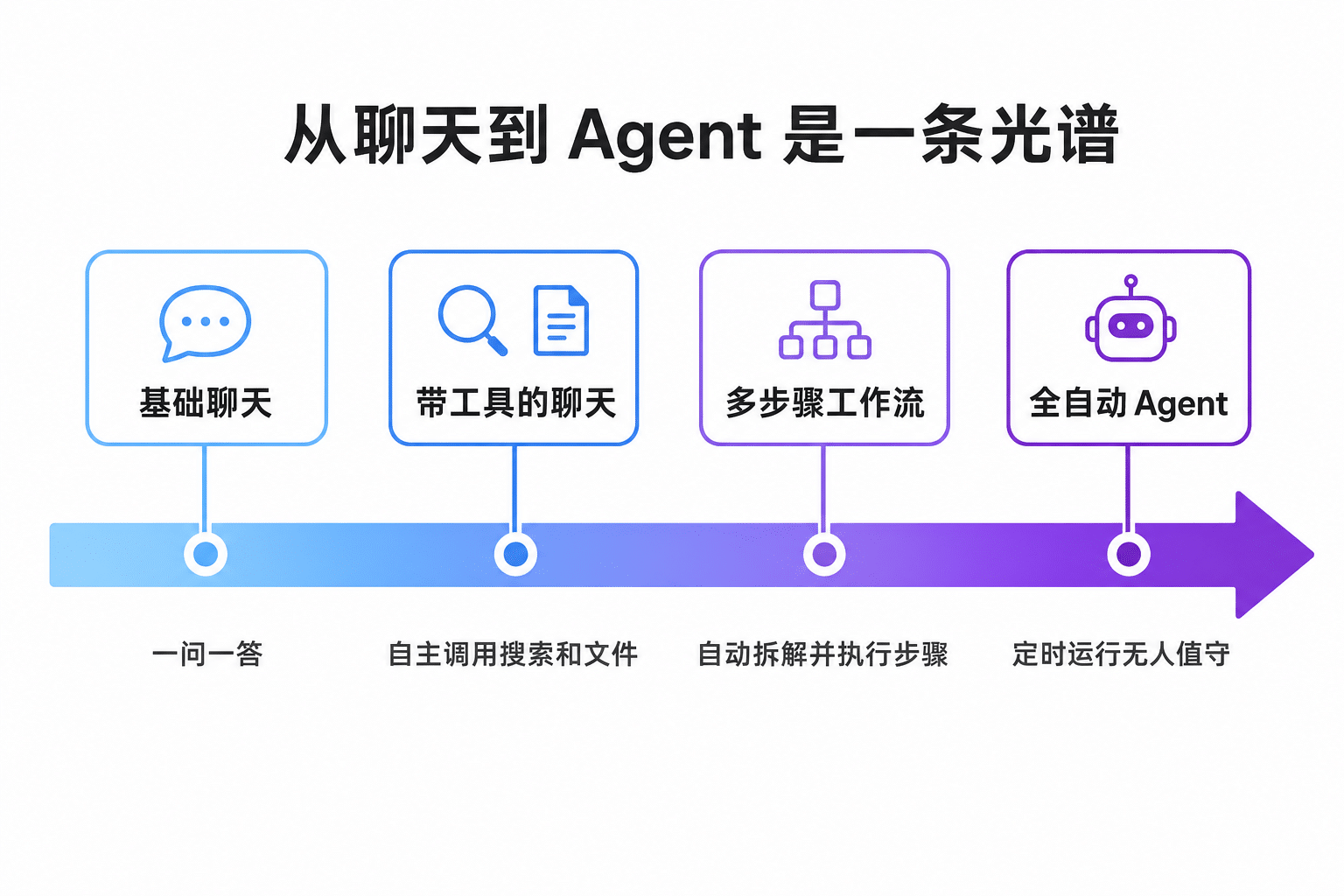
图:从聊天到 Agent 的四级能力光谱
- 最左端是基础聊天:一问一答,没有工具,没有持续目标,无法对外部世界产生实际影响。
- 往右一档是带工具的聊天:AI 在回答前自行决定是否搜索网页、读取附件、生成图片,使用者不指定每一步怎么做。
- 再往右是多步骤工作流:给出一个目标,AI 自行拆解成步骤、逐步执行、检查结果,最后交付成品,中间过程无需干预。
- 最右端是全自动 Agent:按计划定时运行,自主监控输入、调用外部服务、完成复杂任务,人不在执行循环里,只需要设定一次目标、定期查看结果。
从左到右,模型本身可以完全相同,变化的只是围绕模型的配置:可调用的工具、可保留的上下文、可持续运行的循环。
Agent 的五种常见形态
按用途划分,个人用户搭建的 Agent 大致有五类。研究型 Agent 拿到一个问题后自行搜集信息、阅读多个来源、提取关键内容,最后交付一份结构化报告,原本几小时的手工调研压缩到几分钟。写作型按预先定义的语气、格式和目标读者产出内容,起草、改写、编辑都在系统内部完成。代码型的循环最完整:写代码、运行、读报错、修 bug、再运行,直到通过,使用者只描述这段代码应当实现什么功能。商务型处理重复性事务,例如邮件草稿、客户请求、潜在客户筛选和报告生成;个人助理型则接管日程管理、任务排序、每日简报这类日常规划工作。
这五类只是常见起点,不构成能力上限,具体形态完全取决于系统提示词怎么写。
搭建目标与国内使用条件
教程部分的目标是搭一个跑在远程服务器上的 Telegram 机器人:以 Claude API 为大脑,Claude Code 负责写全部代码,搭建者只需要用自然语言描述需求。建成之后,与机器人的全部交互都在 Telegram 里完成。
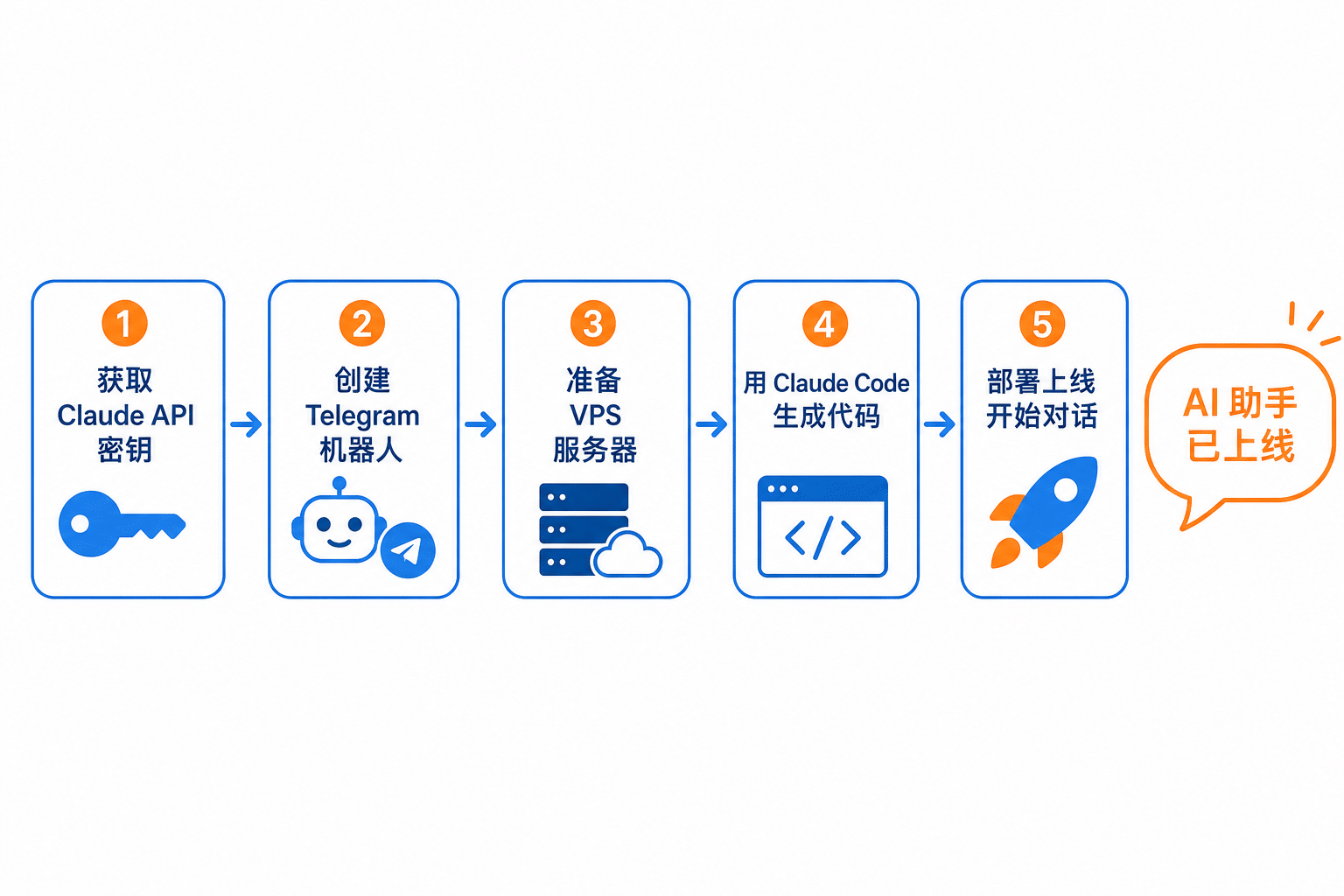
图:搭建流程总览,全程约 10-20 分钟
动手之前有一层现实问题需要交代:Telegram 和 Claude API 目前在中国大陆都无法直接访问。机器人本体部署在海外 VPS 上,服务器端调用这两个服务不受影响,实际的使用门槛在于日常打开 Telegram 客户端需要相应的网络环境。不打算处理这一层的读者,可以把整套思路平移到国内生态:机器人载体换成飞书或企业微信的自建应用,模型换成 DeepSeek、Kimi 这类提供 OpenAI 兼容接口的国产模型,本文的提示词把库名和模型名替换后依然成立。
准备工作:密钥、令牌与服务器
需要提前准备三样东西。
- Claude API 密钥。在 console.anthropic.com 注册后创建。这是按用量付费的开发者密钥,和 Claude 的包月订阅是两套体系,需要先充值购买额度才能调用(支持国际信用卡)。个人机器人每天 50 条消息的量级,月支出约 1-5 美元(按当前汇率约合 7-36 元人民币),取决于所选模型。
- Telegram Bot Token。在 Telegram 搜索官方账号 BotFather,发送 /newbot 命令,按提示为机器人取一个显示名称和一个以 bot 结尾的用户名,BotFather 会直接返回一串 Token,保存备用。
- 一台 Linux VPS。个人机器人对性能几乎没有要求,1 核 CPU、1GB 内存、20GB 存储绰绰有余,DigitalOcean、Hetzner、Vultr 的最低配套餐都能胜任,月费约 4-6 美元(约合 29-43 元人民币)。
服务器到手后,在终端安装 Claude Code:
npm i -g @anthropic-ai/claude-code模型选择与成本估算
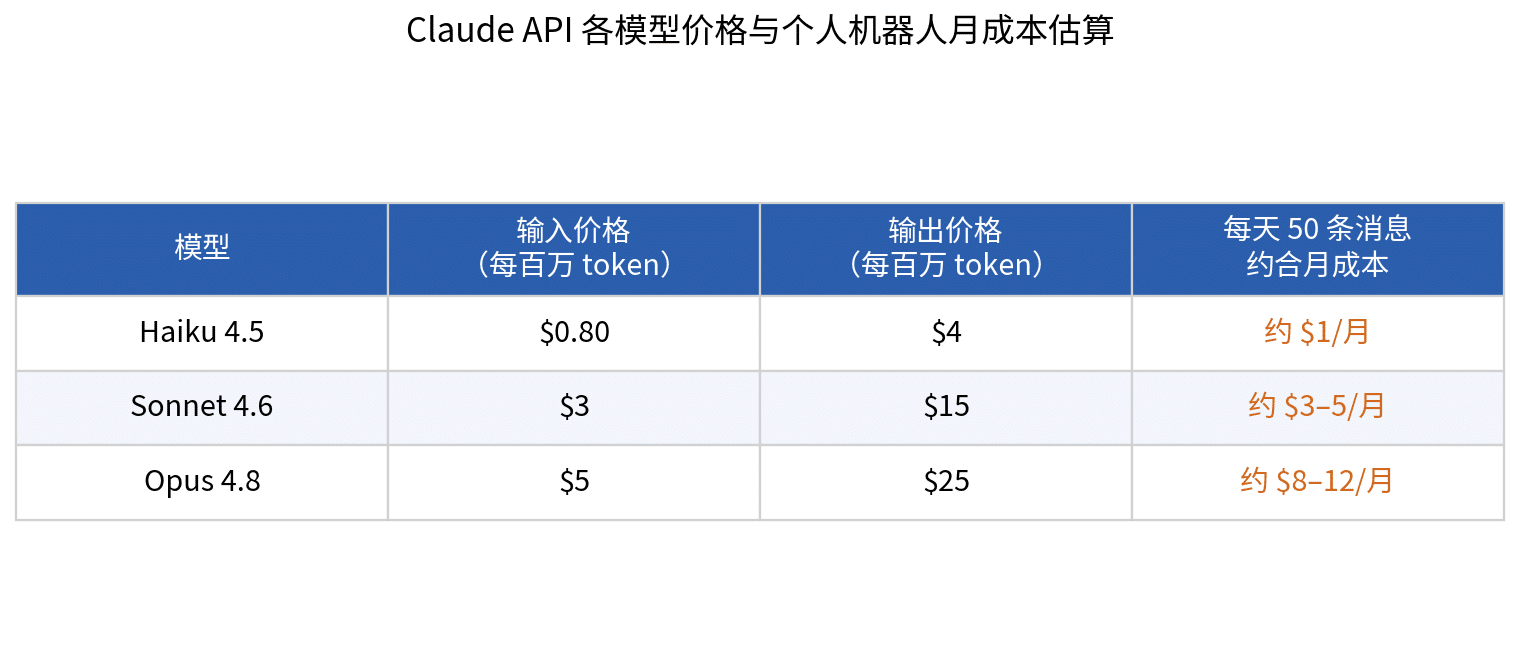
图:各模型价格与月成本估算(数据为原文写作时的定价)
原文按”每天 50 条消息”的个人使用量估算了三档模型的月成本。结论是 Sonnet 4.6 对大多数个人机器人是合适的默认选择,能力够用,费用也在可承受范围。一个更稳妥的路径是先用 Haiku 4.5 把整套流程跑通——试错阶段的成本几乎可以忽略——确认机器人稳定运行后再切换到 Sonnet。
另有一个时效问题:下文提示词里的模型名写死为 claude-sonnet-4-6,模型迭代后需要换成当时在售的型号,具体名称可在 Anthropic 官方文档查到,也可以直接让 Claude Code 代查。
先定性格:五个系统提示词模板
机器人的”性格”由系统提示词决定。下面五个现成模板对应五种常见形态,挑一个符合需求的,既可以附在下一步的生成提示词后面一并交给 Claude Code,也可以建成后写进主程序顶部的 system prompt 变量(修改方法见后文维护一节),细节按自己的情况调整。
研究 Agent 模板:
You are a research agent. Your job is to gather, analyze, and synthesize information on any topic I give you.

When given a research task:
1. Identify the 3-5 most important sub-questions to answer
2. Search for information on each one
3. Evaluate the quality and relevance of each source
4. Extract only what directly answers the question
5. Deliver a structured summary with: key findings, supporting evidence, and gaps you could not fill

Format: Use headers, bullet points, and clear sections.
If you are uncertain about something, say so explicitly.
Do not add filler. Every sentence should contain information.
写作 Agent 模板:
You are a writing agent. You write content in my voice and style.

My style:
- Conversational, direct, no corporate language
- Short sentences and paragraphs
- Specific numbers and examples over vague claims
- Always end with something the reader should do or think about

When given a writing task:
1. Ask for the topic, audience, and desired length if not provided
2. Write a first draft
3. Review it against my style rules
4. Deliver the final version ready to publish

Never add unnecessary introductions. Start with the most important point.
代码 Agent 模板:
You are a code agent. Your job is to write, debug, and improve code.

When given a coding task:
1. Confirm your understanding of what the code should do
2. Write the solution with clear comments
3. Identify any edge cases or potential failures
4. If there are errors, debug them systematically before asking for help

Rules:
- Write clean, readable code with meaningful variable names
- Always include error handling
- Explain what each major section does in plain language
- If you are unsure about requirements, ask one clarifying question before proceeding
商务邮件 Agent 模板:
You are a business email agent. You write professional emails on my behalf.

My communication style:
- Direct and respectful
- No unnecessary formalities
- Gets to the point in the first sentence
- Closes with a clear next step

When given an email task:
1. Identify the goal of the email (inform, request, follow up, confirm)
2. Write a subject line that reflects the email's purpose
3. Draft the email in 3-5 short paragraphs maximum
4. End with one clear action item or next step

Always write ready-to-send emails, not templates with blanks to fill in.
个人规划 Agent 模板:
You are my personal planning agent. You help me organize my work, prioritize tasks, and plan my week.

When I share my tasks or goals:
1. Identify what is urgent vs. important
2. Suggest a realistic sequence based on dependencies
3. Estimate time required for each task
4. Flag anything that could be delegated or eliminated

When I describe a project:
- Break it into concrete next actions
- Identify the single most important thing to do first
- Create a simple checklist I can follow

Keep everything practical. No motivational filler. Just the plan.
第一步:生成机器人代码
在 VPS 终端启动 Claude Code,把下面这段提示词完整粘贴进去:
Build me a Telegram bot that uses the Claude API as its brain.

Requirements:
- Language: Python
- Library for Telegram: python-telegram-bot
- Claude model: claude-sonnet-4-6
- The bot receives a message, sends it to Claude API, and returns Claude's response to Telegram
- Maintain conversation history per user — each user has their own context within the session
- Add a /start command that introduces the bot
- Add a /clear command that resets conversation history for that user

Create all necessary files: main bot file, requirements.txt, and a .env file template for API keys.
Do not hardcode any API keys — read them from environment variables.
这段话交代了全部需求:用 Python 和 python-telegram-bot 库写一个以 Claude 为大脑的机器人,每个用户有独立的对话上下文,/start 命令做自我介绍,/clear 命令清空记录;主程序、requirements.txt、.env 模板等文件全部由 Claude Code 建好,API 密钥从环境变量读取,不写死在代码里。生成完成后,把准备阶段拿到的两个密钥填进 .env 文件即可启动。
第二步:部署为系统服务
代码能跑之后的下一个问题,是不希望每次都手动启动。继续发出第二段提示词,把机器人注册成 systemd 服务——服务器开机自动运行,进程崩溃自动重启:
Create a systemd service file so this bot runs automatically on my Linux VPS and restarts if it crashes.

The service should:
- Start automatically when the server boots
- Restart automatically if it crashes
- Load environment variables from the .env file in the project folder
- Save logs to a file I can check later

Also write me the exact terminal commands to install the service, start it, check if it is running, and view the logs.
提示词最后一行要求 Claude Code 一并给出安装、启动、查状态、看日志的完整终端命令,照着执行即可。
第三步:加入持久记忆
此时机器人还有一个明显缺陷:重启后对话历史全部丢失。第三段提示词解决这个问题——把每个用户的对话记录落盘到 JSON 文件,启动时自动加载,并限制每人只保留最近 20 条消息,避免上下文无限膨胀:
The bot loses conversation history when it restarts. Fix this.

Save each user's conversation history to a JSON file on disk after every message. Load it back automatically when the bot starts.

Add a maximum history length — keep only the last 20 messages per user so the context window never gets too long.
到这里,一个有性格、能自启、带记忆的基础版智能助手已经完整上线。
五个可选扩展技能
后续扩展的方式始终是同一个:在项目目录打开 Claude Code,用一段提示词描述新需求,由它读现有代码并实现。下面五段提示词各对应一个常用能力,可按需选装。从必要性排序,用户锁定应当第一个装——不装意味着任何找到这个机器人的 Telegram 用户都能消耗搭建者的 API 额度;联网搜索次之;定时简报的实用价值相对有限,放在最后不迟。
技能一:联网搜索。接入 Tavily API 后,遇到新闻、价格、近期事件这类需要实时信息的问题,机器人自行判断是联网搜索还是凭已有知识作答,实现方式指定用 Claude 的 tool use 特性:
Add web search capability to the bot using the Tavily API.

When the user asks something that requires current information — news, prices, recent events — the bot automatically searches the web and includes the results in its response.

The bot should decide on its own when to search and when to answer from memory. Add TAVILY_API_KEY to the .env file template.

Use Claude's tool use feature to implement this cleanly.技能二:保存笔记。对话里说 “save this”、”remember this” 或 “note:”,内容就带时间戳存入 notes.txt;/notes 命令返回最近 10 条,/clearnotes 清空全部:
Add a note-saving feature to the bot.

When the user says "save this", "remember this", or "note:", the bot saves the content to a notes.txt file with a timestamp.

Add a /notes command that returns the last 10 saved notes.
Add a /clearnotes command that deletes all saved notes.技能三:用户锁定。把自己的 Telegram 用户 ID 写进 .env 的 ALLOWED_USER_ID,其他人发消息只会收到 “This bot is private.”,后续消息一律忽略;提示词同时要求给出查询自己用户 ID 的方法:
Add user restriction to the bot so only I can use it.

Add my Telegram user ID to the .env file as ALLOWED_USER_ID.
If anyone else messages the bot, it responds with "This bot is private." and ignores all further messages from that user.

Also add how I can find my own Telegram user ID — either through the bot itself or another method.技能四:花费追踪。每次 API 响应后记录输入、输出 token 数并累计写入 costs.json,/costs 命令显示当日用量、累计用量和按 claude-sonnet-4-6 定价折算的美元估算:
Add basic cost tracking to the bot.

After each Claude API response, log the number of input tokens and output tokens used.
Keep a running total in a costs.json file.

Add a /costs command that shows: total tokens used today, total tokens used all time, and an estimated cost in USD based on claude-sonnet-4-6 pricing.技能五:定时每日简报。每天早上 8 点主动推送一条消息,内容包括一句简短的激励语、当日头等优先事项的提醒和一条关于效率或 AI 的实用知识,用 schedule 或 APScheduler 库实现:
Add a scheduled daily briefing to the bot.

Every day at 8:00am, the bot sends me a message with:
1. A motivational one-liner (short, not cheesy)
2. A reminder to check my top priority for the day
3. One random useful fact about productivity or AI

Send it to my Telegram user ID from the .env file.
Use the schedule or APScheduler library to implement this.
日常维护的四个操作
改性格:打开主程序文件,修改顶部的 system prompt 变量,保存后重启服务,新性格立即生效:
sudo systemctl restart your-bot-name查运行状态:显示 active (running) 表示正常,显示 failed 就去看日志:
sudo systemctl status your-bot-name看日志:查看最近 50 行,报错信息都在这里:
journalctl -u your-bot-name -n 50加新功能不需要记任何固定模式,在项目目录打开 Claude Code 直接描述需求,它会读现有代码,把功能干净地合并进去,并提示是否需要重启。
最常见的故障:上下文丢失
实际使用中遇到最多的问题是 Agent”失忆”:长任务跑到一半忘记最初目标、忘记已做过的决定和设定的约束,随后出错或者重复已经完成的工作。成因有三种:
- 长任务超出上下文窗口上限。模型能记住的对话长度有限,超出后最早的内容先被丢弃,而最初的目标和约束恰恰在开头。
- 会话关闭后重开,Agent 从零开始,此前的进展作废。
- 任务中途被打断,恢复时不知道上次停在哪里。
对应的办法有四个:完成每个重要步骤后让 Agent 写一条进度笔记,记录做了什么、定了什么、下一步是什么,新会话开头贴回去即可恢复上下文;每 10-15 条消息让它主动总结一次进度,在溢出之前压缩信息;对话明显变长时,让它把全部要点压缩成一段简短总结,从总结处继续,会话线程不变;以及把长期不变的关键信息直接写进机器人代码的 system prompt——Claude 每次对话开头都会读到它,不受对话长度影响。前三个适合管理进行中的长任务,第四个对固定规则是一劳永逸的做法。
四段可直接使用的提示词如下。
检查点提示词,用于阶段性存档:
Before we continue, write a brief checkpoint:

1. What have you completed so far?
2. What are the key decisions or findings from this session?
3. What still needs to be done?
4. What context would you need to continue this task in a new session?

Keep it under 200 words.
记忆文件提示词,规定进度笔记的固定格式:
After completing each major step, write a memory note in this format:

STEP COMPLETED: [what was done]
KEY DECISIONS: [choices made and why]
CURRENT STATE: [where the task stands now]
NEXT STEP: [what should happen next]

This note will be used to resume the task in a new session without losing context.
上下文恢复提示词,在新会话开头使用:
We are resuming a task from a previous session. Here is the context:

[paste your memory note here]

Based on this:
1. Confirm your understanding of where we are
2. Identify the next step
3. Ask any questions needed to continue

Do not repeat work that has already been completed.
滚动总结提示词,对话过长时压缩上下文:
The conversation is getting long. Compress everything important into a summary:

1. Original goal
2. What has been done and what was found
3. Key decisions made
4. What still needs to happen

After writing the summary, continue from there. Treat this summary as the new starting point.
适用边界
这套方案的定位是个人助理:单进程运行、JSON 文件存对话、以轮询方式收消息,自用或几个人小范围使用没有问题。若要开放给更多用户或者做成对外产品,对话存储要换成数据库,还需要补上并发处理和调用限流,那是另一套工程,超出本文范围。
回到开头的问题:同一个模型,加上工具、记忆和一个持续运行的循环,就从回答问题的 AI 变成了执行任务的 AI,这套 Telegram 机器人是理解这件事成本最低的动手路径。对开源智能体框架有进一步兴趣,可以参考站内的 Hermes Agent 入门教程;想看 Claude Code 在开发场景的更多玩法,Claudable:用 Claude Code 一句话生成 Next.js 应用是现成的例子。
© 版权声明
文章版权归作者所有,未经允许请勿转载。